SalesPartner
p +6444711849
  • Home
  • News
  • Software
    • SalesPartner Cloud
    • Websites
  • Pricing
  • Downloads
  • Contact us

OfficePartner: Itemised advertising spent by salesperson and vendor

29/4/2020

0 Comments

 
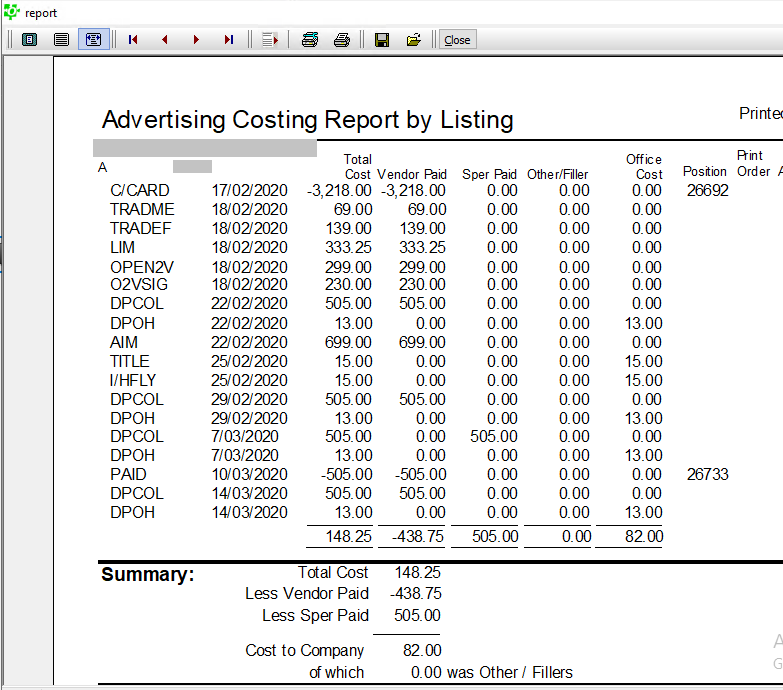
In OfficePartner, Advertising there is a report that breaks down the advertising expenditure within a date range, by the vendor and/or the salesperson.
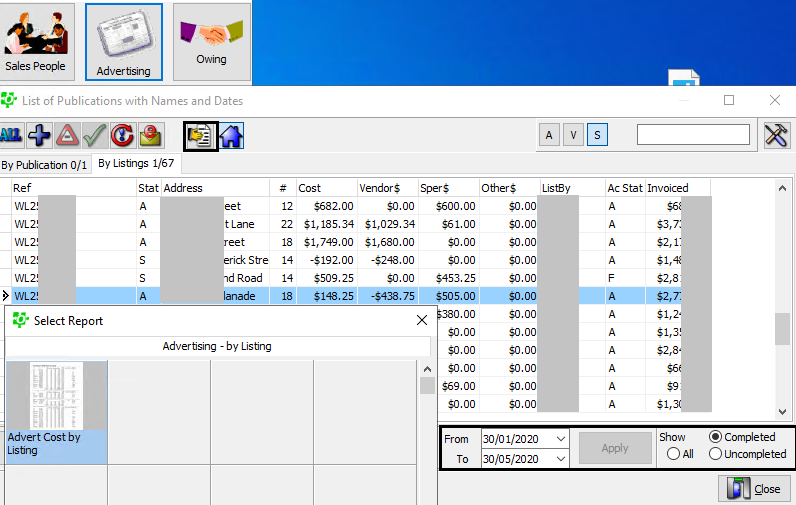
Open Advertising and under the By Listings tab, adjust the date range if required. Note the option to Show Completed campaigns in the lower right corner.
Select the listing you wish to view the report for, then click Print Reports. Double click Advert Cost by Listing.
Picture
The total amount spent by party is shown in the report summary.
Picture
0 Comments

How to withdraw a Trade Me listing

29/4/2020

0 Comments

 
Here are the steps for removing a sold or withdrawn listing from Trade Me.
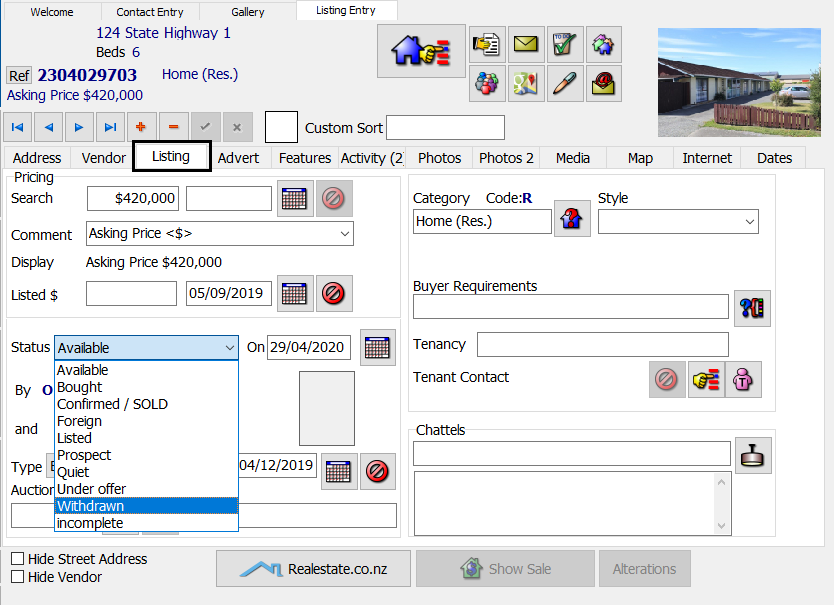
First update the listing's status in SalesPartner via the status drop down menu in Listing Entry, Listing tab.
Picture
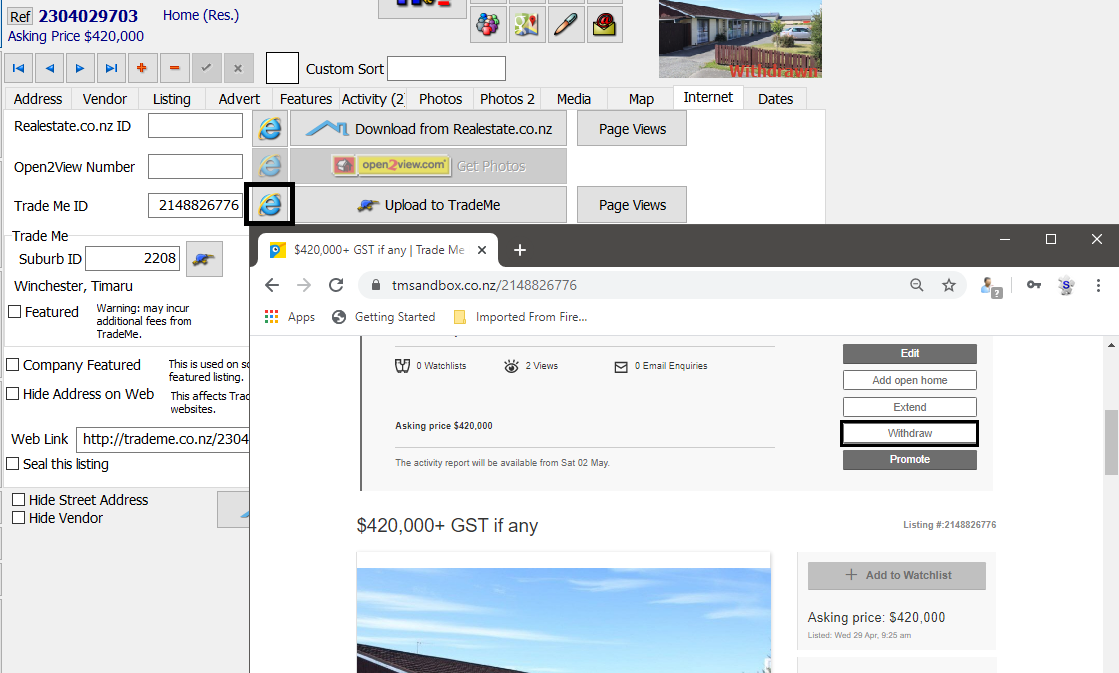
Open the Internet tab and click on the Internet Explorer button next to the Trade Me ID. This will take you directly to the listing's Trade Me page so you can Withdraw the listing under seller's options. Note you must be logged into Trade Me to see the seller's options menu.
Picture
0 Comments

Quick fixes: Realestate.co.nz authentication, Synchro with Eset

28/4/2020

0 Comments

 
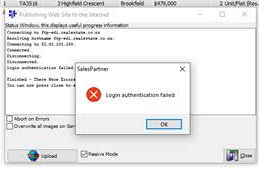
To fix a Realestate.co.nz FTP connection error: invalid credentials / login authentication failed we re-entered the uploader's credentials in upper case then the upload was successful.
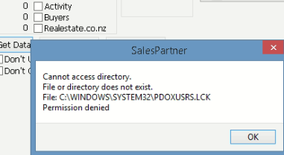
Problem: fix an error on a synchro client PC Cannot access directory. File or directory does not exist. File C:\WINDOWS\SYSTEM32\PDOXUSRS.LCK Permission denied.
Solution: We confirmed that the Synchro tested OK when Eset antivirus was disabled. So then we added exclusions for C:\spartner\*.* (on the server, not the client). We also needed to elevate SocketServer to Run As Administrator under Properties, Compatibility settings.
Picture
Picture
0 Comments

How to: Copy a listing

24/4/2020

0 Comments

 
The Copy a Listing option in Listing Entry is ideal for when you wish to:
  • Advertising a property under several categories,
  • List multiple sections or dwelling configurations,
  • Relist a withdrawn listing under a new reference.
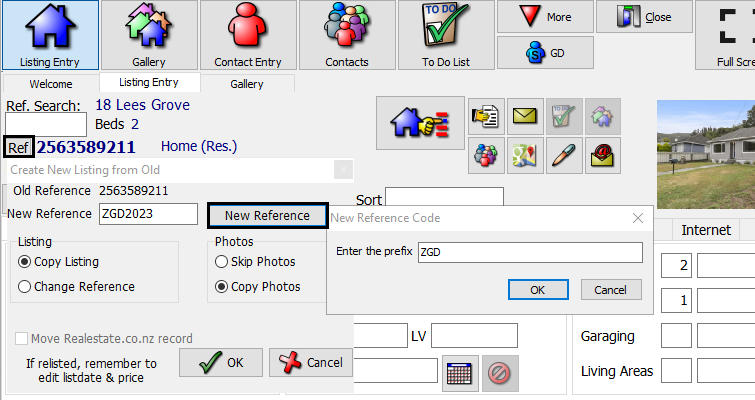
In Listing Entry, Lookup the listing you are going to copy.
Click Ref to open the Copy options. Enter a new reference or click New Reference and enter your prefix to fetch the next sequential reference number.
Click OK to proceed.
Picture
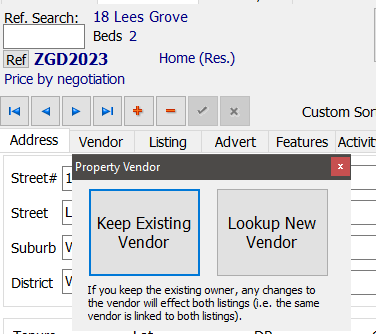
When prompted choose whether to keep the original vendor or lookup a new vendor.
Picture
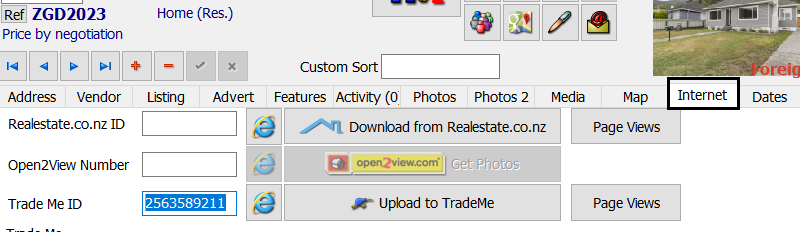
Note: If the copied listing has a Trade Me ID, this will need to be deleted so that the new copied listing can have it's own unique Trade Me ID code. You can delete the Trade Me ID under the Internet tab.
Picture
0 Comments

SalesPartner Registrations

24/4/2020

0 Comments

 
From Friday 24 April 2020, new registration codes will be available for current subscribers to install. You will be prompted to re-register when you open SalesPartner. A 7 day grace period either side of 1st May allows you to re-register before automatic data locking is enforced. The grace period will end on 7th May. After the grace period, a new valid registration code will be required to access SalesPartner.

Should you be unable to re-register automatically when you press the re-register button please contact us to request your code so that you can enter it manually. Cloud subscribers and salespeople running databases on office systems should follow the same process to confirm their registrations.

When you successfully re-register the number turns green and the re-registration window will not re-appear. If this is not the case for you please let us know as soon as possible so we have time to track any missed subscriptions during the grace period.
0 Comments
<<Previous
    AnyDesk Windows Link
    AnyDesk Mac Link
    Log in

    Admin
    Geoff Duncan

    Archives

    June 2022
    October 2021
    September 2021
    August 2021
    July 2021
    June 2021
    May 2021
    April 2021
    March 2021
    February 2021
    January 2021
    December 2020
    November 2020
    October 2020
    September 2020
    August 2020
    July 2020
    June 2020
    May 2020
    April 2020
    March 2020
    February 2020
    January 2020
    December 2019
    November 2019
    October 2019
    September 2019
    August 2019
    July 2019
    June 2019
    May 2019
    April 2019
    March 2019
    February 2019
    January 2019
    December 2018
    November 2018
    October 2018
    September 2018
    August 2018
    July 2018
    June 2018
    May 2018
    April 2018
    March 2018
    February 2018
    January 2018
    December 2017
    November 2017
    October 2017
    September 2017
    August 2017
    July 2017
    June 2017
    May 2017
    April 2017
    March 2017
    February 2017
    January 2017
    December 2016
    November 2016
    October 2016
    September 2016
    August 2016
    July 2016
    June 2016
    May 2016
    April 2016
    March 2016
    February 2016
    January 2016
    December 2015
    November 2015
    October 2015
    September 2015
    August 2015
    July 2015
    June 2015
    May 2015
    April 2015
    March 2015
    February 2015
    January 2015
    December 2014
    November 2014
    October 2014
    September 2014
    August 2014
    July 2014
    June 2014
    May 2014
    April 2014
    March 2014
    February 2014
    January 2014
    December 2013
    November 2013
    October 2013
    September 2013
    August 2013

    Categories

    All

    RSS Feed

Picture
"SalesPartner helps me extract maximum value from my
biggest asset - my database".

Andrew Duncan
www.agentmonday.com


Picture
Developed in Wellington, New Zealand
SalesPartner Software - established in 1993
Leading-edge software for real estate salespeople